
Odoo applications · purchasing
Odoo Purchase: spending commitments finally traced
Requests for quotation, approval workflows, order-receipt-invoice matching: spend is known when it is committed, not when the invoice arrives.
This page describes what the Odoo 20 Purchase application does as standard for procurement management, its real limits and ANOR's method for deploying it. It is aimed at buyers, production managers and finance directors.
Six strengths of Odoo Purchase for your procurement
From need to order
The workflow is the same for every department. No more orders placed by phone that nobody knows anything about.
Approvals based on written thresholds
Above a given amount, approval is mandatory and timestamped. The agreement given in a corridor no longer vanishes.
Order, receipt, invoice matching
Quantities ordered, received and invoiced are compared in Odoo. Discrepancies are spotted before payment.
Comparable supplier requests for quotation
The same need sent to several suppliers, with the replies lined up side by side. Negotiation starts from a fact.
Searchable price history
Past purchase prices can be consulted by product and by supplier: concrete support for negotiating.
Needs generated by production
Replenishment is triggered by planned orders and stock rules. Purchasing anticipates instead of reacting to emergencies.
From request for quotation to purchase order
The same document follows the purchase, from the request for quotation to the vendor bill, with receipt and billing in view.
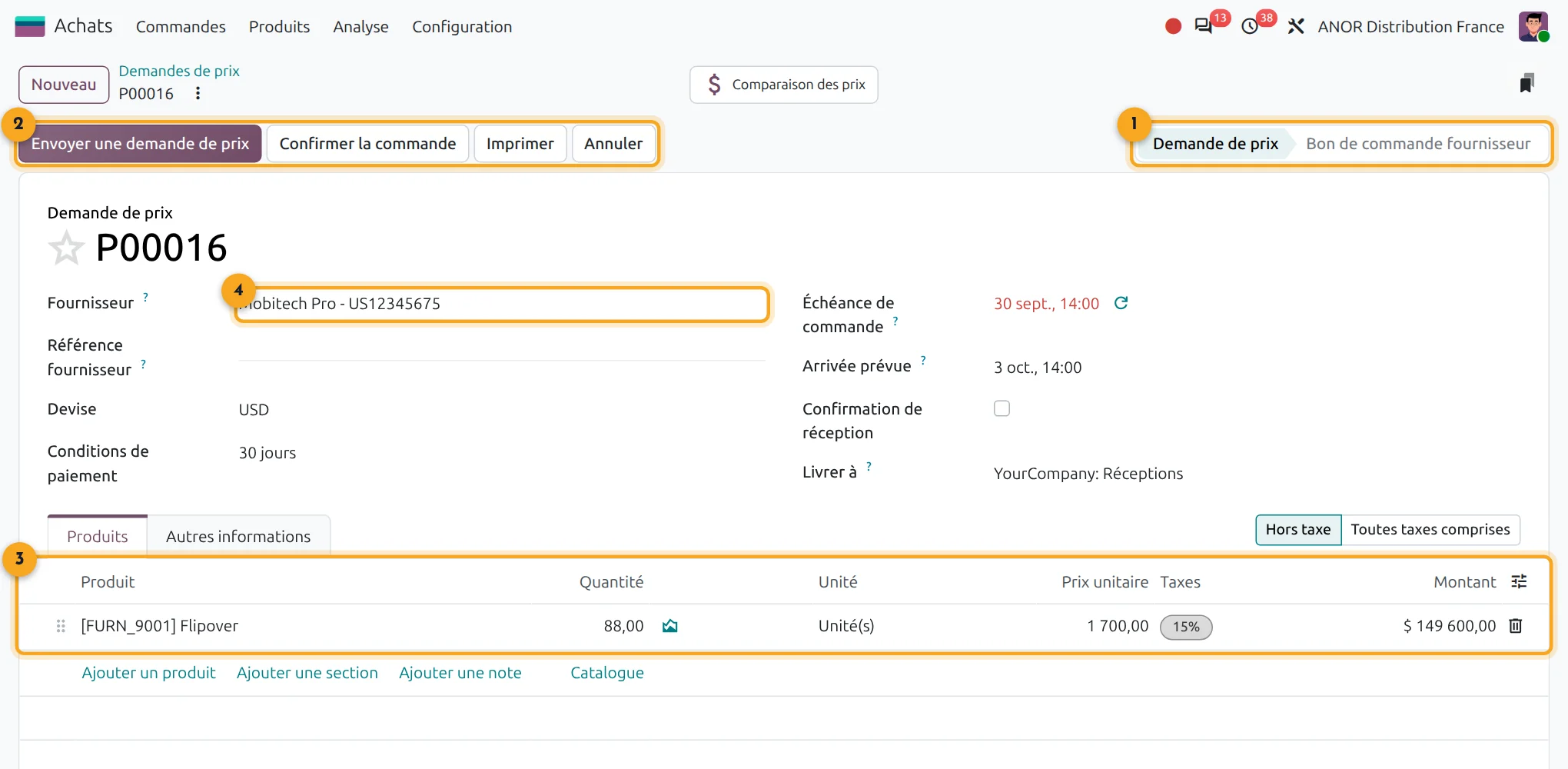
1Status
Request for quotation or vendor purchase order.
2Actions
Load the bill, send the purchase order, print or cancel.
3Purchase lines
Ordered, received and billed quantities side by side.
4Vendor
The vendor and its terms are carried into every purchase.
What does Odoo Purchase cover?
Short answer: Odoo Purchase covers requests for quotation, purchase orders, approvals, receipt tracking and invoice control. It connects to Inventory, Accounting and Manufacturing.
Odoo Purchase is included in Odoo's "Custom" plan: €35.90 per user per month for the first year, then €44.90 from the second year. All applications are included.
- Linked applications: Inventory, Accounting, Manufacturing
- Real prerequisite: approval thresholds decided in writing
- Go-live: short when the supplier file is clean, with the duration depending on the number of approval workflows
Points to scope before starting
Complex tenders
Odoo compares lined-up offers. Weighted multi-criteria bid evaluation is scoped as a custom development.
Advanced supplier portal
exchanges mainly go through email and documents. A rich portal requires development.
Supplier evaluation
it remains basic as standard.
Approval thresholds
without rules decided beforehand, the workflow slows things down without controlling anything.
The problem you recognise: you discover the spend when the invoice arrives
Orders go out by email, by phone, sometimes from memory. No commitment is visible before the invoice. Price discrepancies go unnoticed and the budget is checked after the fact, when there is nothing left to decide.
Untraced purchasing is first and foremost an organisational problem: thresholds never set, verbal approvals, a need expressed directly to the supplier. We deal with it upstream, in a process review: a free situation audit, then scoping of thresholds and approval workflows with an Odoo consultant. To link purchases to a job, see our purchase by job module.
ANOR's method for deploying Odoo Purchase
1
Scoping
Purchasing workflows, approval thresholds, categories and key suppliers are documented with the buyers and management.
2
Configuration
Purchase terms, units, approval rules and replenishment are configured in standard Odoo.
3
Supplier data migration
The supplier file and purchase price lists are cleaned, then loaded.
4
Go-live
Supported start-up, with the first orders checked through to the invoice.
Odoo 20 AI for Purchase
Odoo 20 adds AI agents to the Purchase app, available in the Enterprise edition, to support buyers. We check with you which uses bring a real gain before enabling them.
Frequently asked questions about Odoo Purchase
Yes. An approval threshold by amount can be configured as standard, with a record of who approved and when. Multi-level workflows are checked during scoping.
Yes, through lined-up requests for quotation. A weighted multi-criteria evaluation remains outside the standard.
Odoo compares the quantities ordered, received and invoiced. Discrepancies appear before payment, so that you only pay for what has been delivered.
Yes, based on minimum stock rules or manufacturing needs. Odoo proposes orders and you decide. See also Odoo Inventory.
Yes. Supplier requests for quotation, orders, receipts and invoices follow on from each other in the same database as stock and accounting. Replenishment rules propose orders at the right time and the buyer decides. Odoo Purchase is included in the "Custom" licence.
Odoo Purchase is included in the "Custom" licence at €35.90 per user per month for the first year, then €44.90 from the second year. The integration cost depends on your purchasing workflows: it is priced after a 30-minute discussion.
The Odoo apps involved

Purchase
Requests for quotation, purchase orders and vendor bill control.


Does your purchasing fit the standard?
Thirty minutes with a consultant to test your approval workflows against what Odoo Purchase does, before any development quote.