
Odoo applications · accounting
Odoo Accounting: close in days, not weeks
E-invoicing, VAT, bank reconciliation, matching and analytics by job: accounting becomes a tool for steering the current month.
This page describes what the Odoo 20 Accounting application does for a French company, as SME accounting software connected to sales and purchasing, its real limits and ANOR's method for putting it into service. It is aimed at business owners, finance directors and accountants.
Six strengths of Odoo Accounting
E-invoicing
Odoo 20 offers a France module to issue and receive electronic invoices through the vendor's approved platform. Connecting to another platform and the configuration are scoped with you.
Faster bank reconciliation
Statement import or synchronisation, reconciliation suggestions based on rules you configure: manual entry decreases.
Pre-filled supplier invoices
The optional automatic reading service for purchase invoices pre-fills supplier, amounts and due dates. The accountant checks instead of keying in.
Analytics by job
Margin by site, by customer or by activity. It is this level of insight that changes decisions.
Configurable customer reminders
Reminder levels, progressive tone and manual exclusions. Chasing unpaid invoices becomes regular, with no extra effort.
Up-to-date dashboards
Cash, profit and customer outstandings can be viewed for the current month, not the previous quarter.
The customer invoice, step by step
The invoice moves from draft to posted, then to payment, with no re-entry.
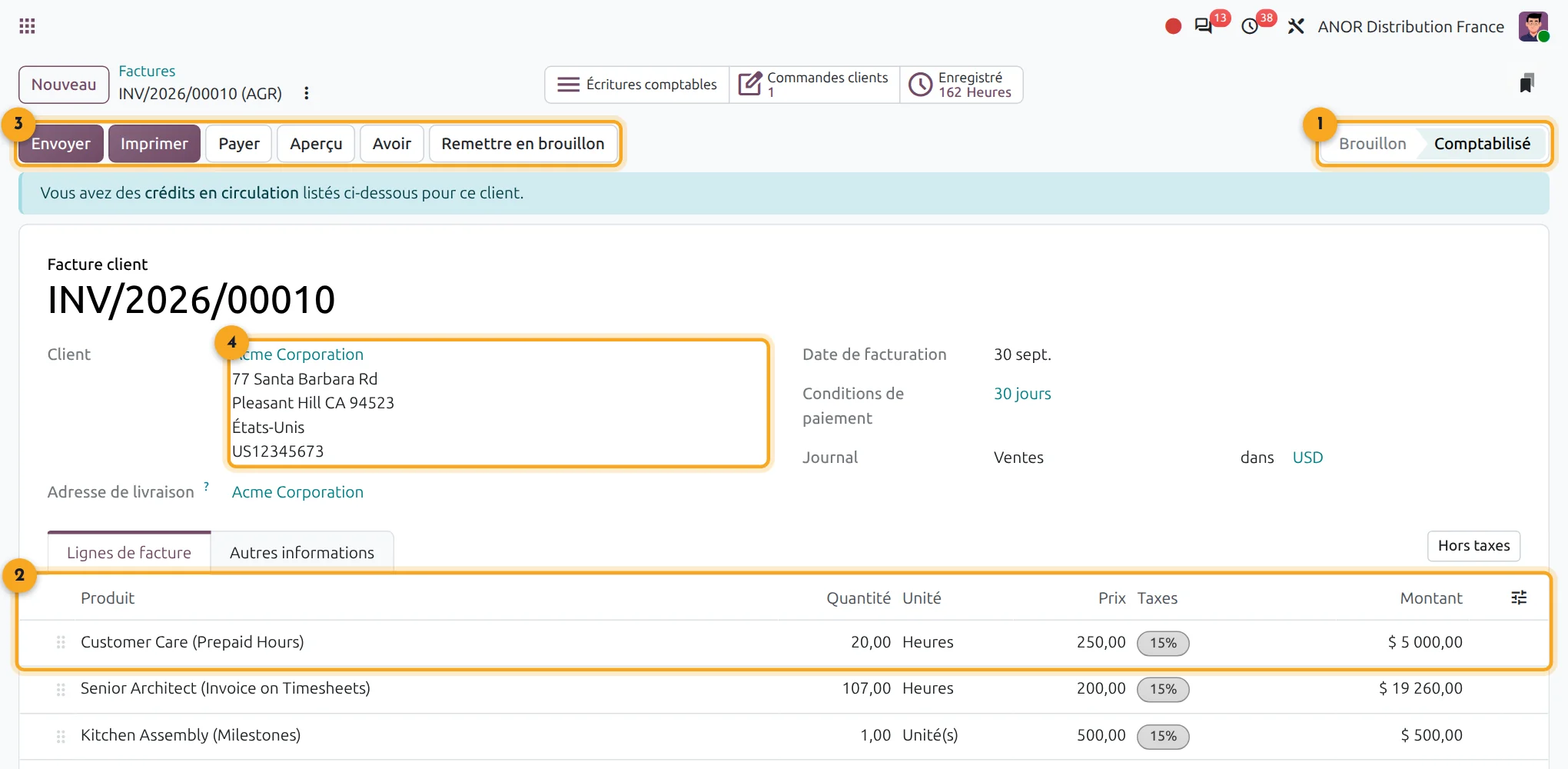
1Status
Draft or posted: the status is always visible.
2Invoice lines
Products, prices, taxes and amounts carried over from the quotation.
3Actions
Send, print, issue a credit note or reset to draft.
4Customer
The customer and address come from the order.
What does Odoo Accounting cover for a French SME?
Short answer: Odoo Accounting covers general accounting on the French chart of accounts, customer and supplier invoices, VAT, bank reconciliation, matching, payment reminders, analytics and the FEC audit file export. Detailed statutory statements remain with your chartered accountant.
On the licence side, Odoo accounting is included in Odoo's "Custom" plan: €35.90 per user per month for the first year, then €44.90 from the second year, with all applications.
- Linked applications: Sales, Purchase, Project, payroll interface
- Real prerequisite: an agreed chart of accounts and analytic plan
- Go-live: longer than for other applications, with the duration depending on the migration of historical data
E-invoicing: what Odoo allows, what remains to be scoped
Short answer: since 1 September 2026, every VAT-registered business must be able to receive its invoices through an approved platform. Issuing becomes mandatory for SMEs from 1 September 2027.
Odoo 20 offers a module dedicated to France: issuing and receiving electronic invoices through the vendor's approved platform. We do not promise compliance on your behalf. It depends on the platform used, your mandatory data (customer SIREN number, nature of the transactions, delivery address) and your actual flows.
Our approach: check your master data, test the receipt of your supplier invoices, then validate issuing on a sample before rolling it out. See also our article on the e-invoicing obligation.
Points to scope before starting
Tax return package and detailed statutory statements
they remain the business of the chartered accountant and their tools. Odoo produces the accounting entries file (FEC) to send them your data.
Multi-GAAP consolidation
it is not covered as standard.
Migrating a full history
it is a project in itself, never a weekend import.
Poorly agreed analytic plan
it produces wrong reports, very quickly. This is the real issue, before the software.
In accounting, the difficulty is rarely the entry. It is an analytic plan that nobody has agreed on and spending commitments outside any workflow. We deal with it upstream, in a process review: a free situation audit, then scoping of the analytic plan and commitment workflows with an Odoo consultant and your chartered accountant.
ANOR's method for deploying Odoo Accounting
1
Scoping
Chart of accounts, analytic plan, journals, bank accounts and approval workflows are agreed with the finance director and your chartered accountant.
2
France configuration
French localisation, taxes, payment terms and reminders are configured in standard Odoo. Our chart of accounts import module speeds up the migration.
3
Migration and testing
Opening balances, partners and open invoices are loaded, then checked with your accountant.
4
Switchover and follow-up
Go-live at a chosen closing date, then support from our team.
Odoo 20 AI for accounting
Odoo 20 embeds AI in a particularly advanced way: AI agents in the applications, AI-computed fields and connection to external tools through the MCP protocol. Your accounting benefit without heavy development: we check with you which uses bring a real gain before enabling them.
Frequently asked questions about Odoo Accounting
Yes. Odoo's French localisation installs the French general chart of accounts (PCG), French taxes and fiscal positions, VAT return preparation and the export of the FEC audit file required by the tax administration. Detailed statutory statements are still produced with your chartered accountant.
Odoo 20 offers a module for e-invoicing in France. Your organisation's compliance depends on the approved platform used and on your data: we check it together on your actual flows before go-live.
Matching reconciles payment and invoice entries, manually or through automatic suggestions. It feeds outstanding tracking and customer reminders.
Yes. Taxes are configured by product and by fiscal position and the VAT return is prepared from the entries. Special cases (specific regimes, down payments) are checked during scoping.
Yes, with a dedicated migration project: chart of accounts, partners, opening balances and open invoices. The full history is discussed according to its real usefulness.
Yes for day-to-day bookkeeping: general ledger, customer and supplier invoices, VAT, bank, reminders and analytics, in the same database as sales and purchasing. Your chartered accountant receives the FEC file and keeps the statutory filings. Odoo Accounting is included in the "Custom" licence, with no separate accounting program to keep in sync.
Accounting is included in the "Custom" licence at €35.90 per user per month for the first year, then €44.90 from the second year. The integration cost depends mainly on the migration of historical data: it is priced after a 30-minute discussion.


Does your accounting fit the standard?
Thirty minutes with a consultant to review your chart of accounts, your analytic plan and your e-invoicing flows.