
Odoo Apps · Sales
Odoo Sales: from quote to invoice without re-keying
Quotes that can be viewed and signed online, customer-specific pricing, margin visible before sending, then order, delivery and invoice without retyping a line.
This page describes what the Odoo 20 Sales app does out of the box as quoting and invoicing software, its real limits and what we configure for our clients. It is aimed at sales managers and sales administration teams looking for sales management connected to stock and accounting.
Six strengths of Odoo Sales
A quote that can be viewed online
The customer opens the quote from their portal, sees the options and chooses. You are notified when they view it, which helps you follow up at the right moment.
Online signature included
The customer signs from the quote, with no printing or scanning. Depending on the setting you choose, the order is confirmed as soon as it is signed.
Zero re-keying through to the invoice
Order, delivery note and invoice are generated from a single entry. This is where many hours of administration get lost.
Customer pricing without a side spreadsheet
Price lists by volume, segment or currency, with validity dates. Sales reps no longer have to pick the price from memory.
Managed follow-ups
Scheduled activities and automated actions remind you of unanswered quotes. You stay in control of sensitive accounts.
Margin visible before sending
Cost, price and margin per line and per quote. Reps see what a discount costs before granting it.
The quotation, from sending to order
One screen carries the quotation, its lines and the actions that move it to a confirmed sales order.
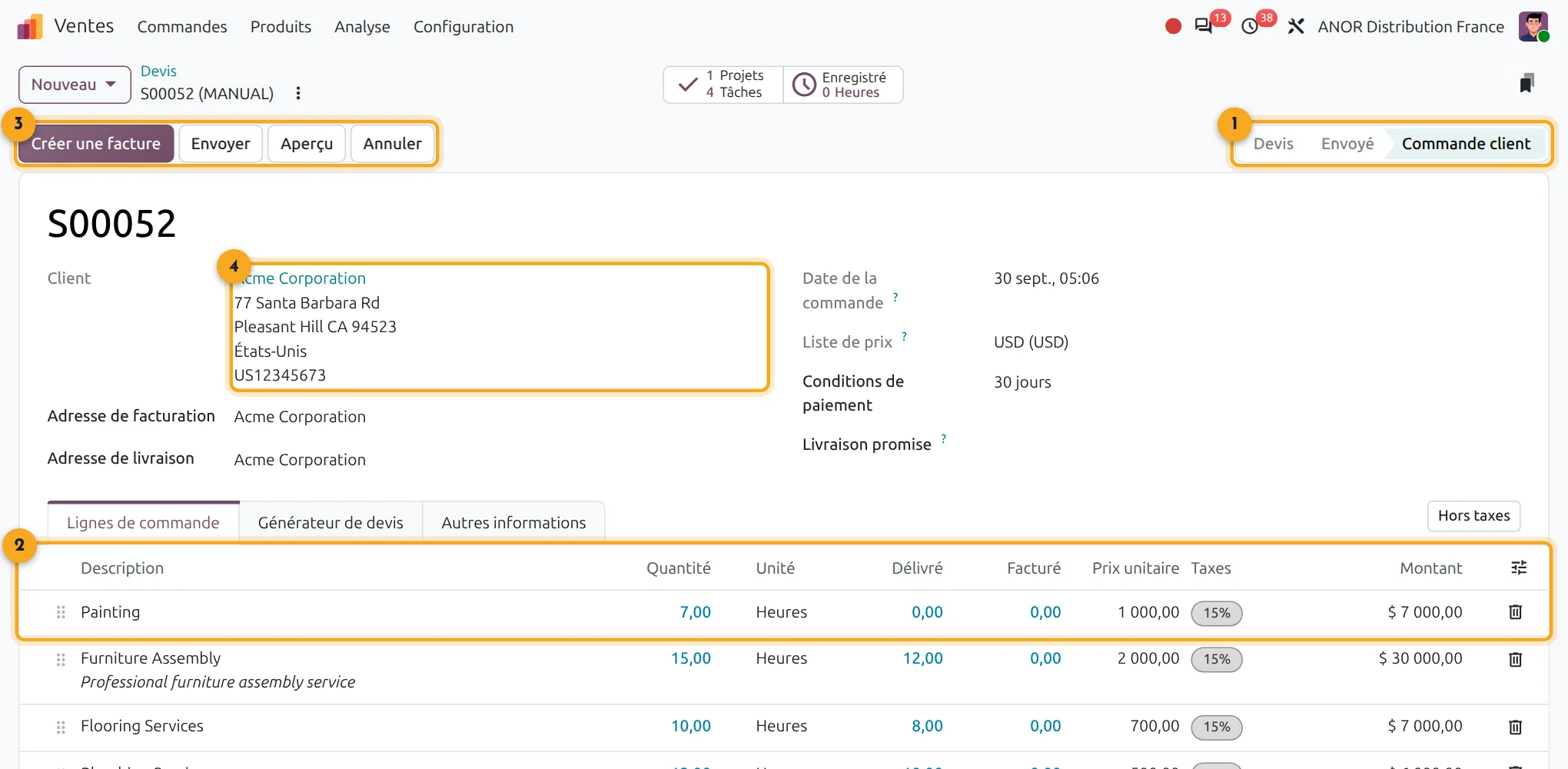
1Quotation status
Quotation, sent, sales order: the state reads at the top right.
2Order lines
Products, quantities, unit prices and taxes in one table.
3Actions
Send, confirm, customer preview or cancel in one click.
4Customer details
Invoice and delivery addresses come from the customer.
What does Odoo Sales cover in sales management?
Short answer: Odoo Sales covers quotes, sales orders, pricing, online signature, margin and invoicing. It connects to CRM, Inventory and Accounting on a single database.
Odoo Sales is included in Odoo's "Custom" plan: €35.90 per user per month for the first year, then €44.90 from the second year. All apps are included.
- Linked apps: CRM, Inventory, Accounting, Timesheets
- Real prerequisite: a written catalogue and discount policy
- Go-live: from a few weeks to a few months depending on the catalogue and approval flows
Points to scope before starting
A well-presented ERP does not replace honest scoping. Here are the points our organisation consulting scopes from the first conversation.
Product configurator
variants are managed through attributes, which is rarely enough for heavy made-to-order work.
Commissions
a simple calculation can be configured. Complex multi-tier scales call for advanced configuration, even development.
Quote layout
it is functional. A highly polished result requires reworked layouts.
Discount policy
nothing replaces it. Without written rules, the tool records the disorder instead of fixing it.
The problem you recognise: the quote goes out fast, the invoice arrives late
Quotes are made in Word, renumbered by hand and left to sit in a shared folder. Nobody knows which ones are pending. Invoicing starts again from scratch at month end and discrepancies are found when the customer is chased, sometimes well after the due date.
On these projects, what blocks progress is rarely the application. It is a discount policy that nobody has written down and approvals given verbally. We deal with this upstream, in a process review that covers the entire chain, from quote to invoice. This situation audit is free: an Odoo consultant scopes your sales management before the first line of configuration.
The ANOR method for deploying Odoo Sales
1
Scoping
Catalogue, approval flow, discount policy and quote templates are surveyed with sales administration.
2
Configuration
Products, price lists, payment terms and quote templates are configured using standard features.
3
Data migration and training
Customers and items are loaded. Teams are trained on their own cases, from entry to invoice.
4
Go-live
Supported start-up, then follow-up through support and application maintenance.
Odoo 20 AI for Sales
Odoo 20 adds AI agents to the Sales app, available in the Enterprise edition, to support the sales team. We check with you which uses bring a real gain before enabling them.
Frequently asked questions about Odoo Sales
Yes. The quote opens from the customer portal and can be signed electronically. Confirming the order on signature is a setting.
Yes, through price lists: by customer, by volume, by currency or by validity period. Very specific cascading discounts are checked during scoping.
Yes. You can invoice on order, on delivery or on progress, depending on the policy for each product or customer.
Odoo Sales brings quote, order and invoice together in one tool, connected to stock and accounting. For an SME still invoicing from a spreadsheet or a word processor, it is complete sales management included in the "Custom" licence, with no separate invoicing program to keep in sync.
Yes. An opportunity creates a quote in one click and the quote moves the opportunity forward. See the Odoo CRM page.
Yes, with the Subscriptions app, included in the licence. A recurring contract generates its invoices at the chosen interval and the customer manages the subscription from the portal. Scoping covers your renewal and cancellation rules.
Odoo Sales is included in the "Custom" licence at €35.90 per user per month for the first year, then €44.90 from the second year. The integration cost depends on your catalogue and approval flows: it is quoted after a 30-minute conversation.
The Odoo apps involved

Sales
Quotations, orders, pricing and invoicing from the same screen.


Does your sales cycle fit the standard?
Thirty minutes with a consultant to check your catalogue, your discount policy and your approval flows.