Odoo Apps · Point of Sale
Odoo Point of Sale: a till linked to stock and accounting
A till that deducts real stock and prepares the accounting entries. The break between the store and the back office disappears.
Odoo Point of Sale is till software connected to stock: it takes payments in store on the same catalogue, stock and customer file as the rest of the ERP. ANOR deploys it for retail businesses and store networks, after checking the hardware and the compliance of the till.
What the standard covers
What the integrated till brings in Odoo 20, with the Custom plan that includes all apps.
Touchscreen till
On-screen checkout, with compatible payment terminals, scanners and printers. Behaviour during a connection loss is validated in a demo.
Store stock = real stock
Every receipt deducts from stock shared with the web and wholesale. One truth for all channels.
Accounting entries
At session close: takings by payment method, cash differences and entries ready to review.
Loyalty and promotions
Cards, points and time-limited promotions. Exceptional discounts are tracked.
Customer record at the till
The salesperson finds the customer's history and details from the same file as the rest of the ERP.
Multiple stores
Each store has its own session and management reads the consolidated whole.
The till receipt in the back office
Every till sale lands in Odoo with its lines, customer, payment and accounting status.
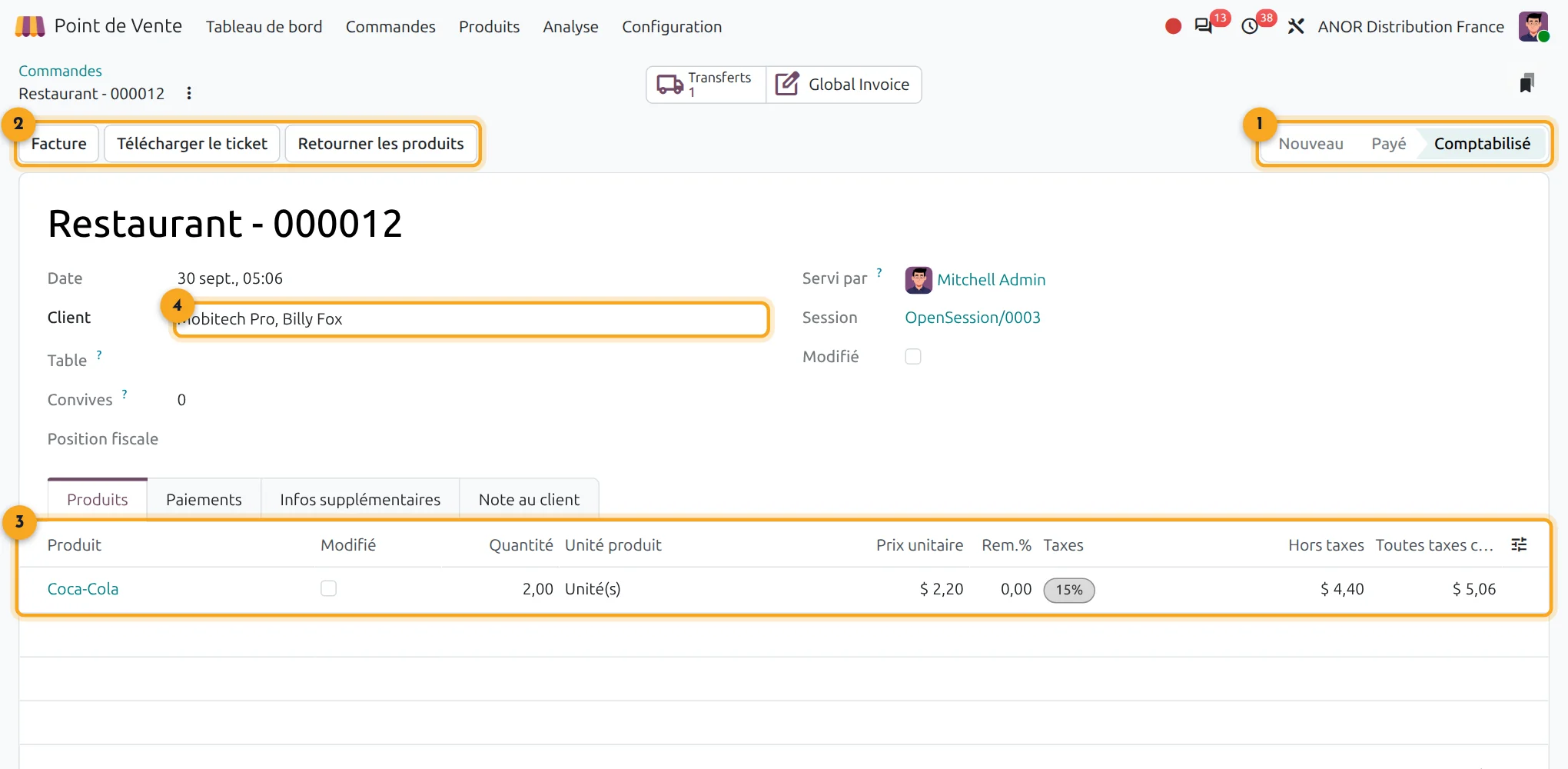
1Status
New, paid or posted: the sale follows its cycle.
2Actions
Invoice, download the receipt or return the products.
3Receipt lines
Product, quantity, price, discount and taxes.
4Customer and session
The customer, the cashier and the till session are attached.
What problem does till software connected to stock solve?
Often, the till records sales but stock is corrected by hand and accounting takes over the till closures at month end. The stock shown on the website bears no relation to the stockroom and customers discover the stock-out after ordering.
With Odoo Point of Sale, every receipt moves real stock and every session produces its accounting entries.
Short answer: an integrated till removes re-keying between store, stock and accounting. It does not replace a tax compliance check or the choice of compatible hardware.
Points to scope before starting
Weighed items
A compatible scale connects to the till. We check the model with you before deployment.
Till hardware
Hardware is chosen among the models compatible with Odoo. We draw up the list with you.
Loyalty and promotions
Loyalty and promotions are configured in the app. A complex multi-brand programme is scoped separately.
Tax compliance
Till compliance is checked before any deployment, with the vendor's certificates.
Our method for deploying Odoo Point of Sale
1
Clean up the catalogue
Items, categories, barcodes and prices must be kept clean before the first receipt.
2
Choose the hardware
We validate the terminal, printer and scanner models compatible with your use.
3
Check compliance
We review with you the tax requirements that apply to your till before going live.
4
Roll out store by store
A first store acts as a pilot, then we extend to the others.
Stock discrepancies rarely come from the software
On retail projects, stock discrepancies come from movements between stockroom and shop floor that nobody records. Our organisation consulting addresses this before implementation: a free situation audit in store, then a process review of the flows between stockroom, till and website.
The till comes into its own with the online shop: see Odoo eCommerce. For the business context, see our page on commerce and retail.
Odoo 20 AI for point of sale
Odoo 20 embeds AI in a particularly advanced way: AI agents in the applications, AI-computed fields and connection to external tools through the MCP protocol. Your tills benefit without heavy development: we check with you which uses bring a real gain before enabling them.
Frequently asked questions about Odoo Point of Sale
Yes, in-store sales move stock shared with the other channels. This is what allows a reliable stock level to be shown on the website.
Behaviour depends on the version and the hardware. We check it in a demo on your configuration before committing on this point.
They are generated at the close of each session, by payment method, with cash differences. A review is still needed before validation.
Yes. Each store has its own sessions and rules and management views a consolidated picture.
A touchscreen or tablet, a receipt printer, a payment terminal and a scanner depending on use. We validate compatible models before purchase.
Odoo Point of Sale, because it shares the catalogue, stock and customers with the ERP with no connector. A till connected to stock removes re-keying and gives retailers reliable stock across every channel.
Yes. A free situation audit, carried out in store, records the hardware, the flows between stockroom and shop floor and the loyalty rules. This upfront consulting secures the hardware choice and the first pilot store.
The Odoo apps involved

Point of Sale
Touch-screen till, receipts and closing, even offline.


Does your till fit the standard?
Thirty minutes with a consultant to check your hardware, your till compliance and your stores against your actual organisation.