
Odoo Apps · Field Service
Odoo Field Service: invoice as you go, not at month end
Scheduled rounds, a report signed by the customer on site, parts used recorded, invoice generated. The delay between work done and invoice issued shrinks.
Odoo Field Service covers field service management for your technicians: maintenance, repairs, installation. ANOR deploys it for service companies that want a readable technician schedule, a signed job report without paper and an invoice without reconstruction.
What the standard covers for field service management
What job tracking brings in Odoo 20, with the Custom plan that includes all apps.
Technician on mobile
Today's round, history, photos and report accessible from a phone or tablet.
Customer signature
The customer signs on screen and the report is sent to them: the record of what was done is dated and shared.
Parts used
Products used are recorded during the job and leave stock.
Invoice generated from the job
Time and parts are valued according to the sale or contract, with no re-keying.
Map-based planning
Jobs are allocated according to availability and area, with a map view.
Preventive maintenance
Periodic visits rely on contracts and the Maintenance app so that none is forgotten.
Interventions, scheduled by resource
Each row is a technician, each slot an intervention: the week's workload reads at a glance.
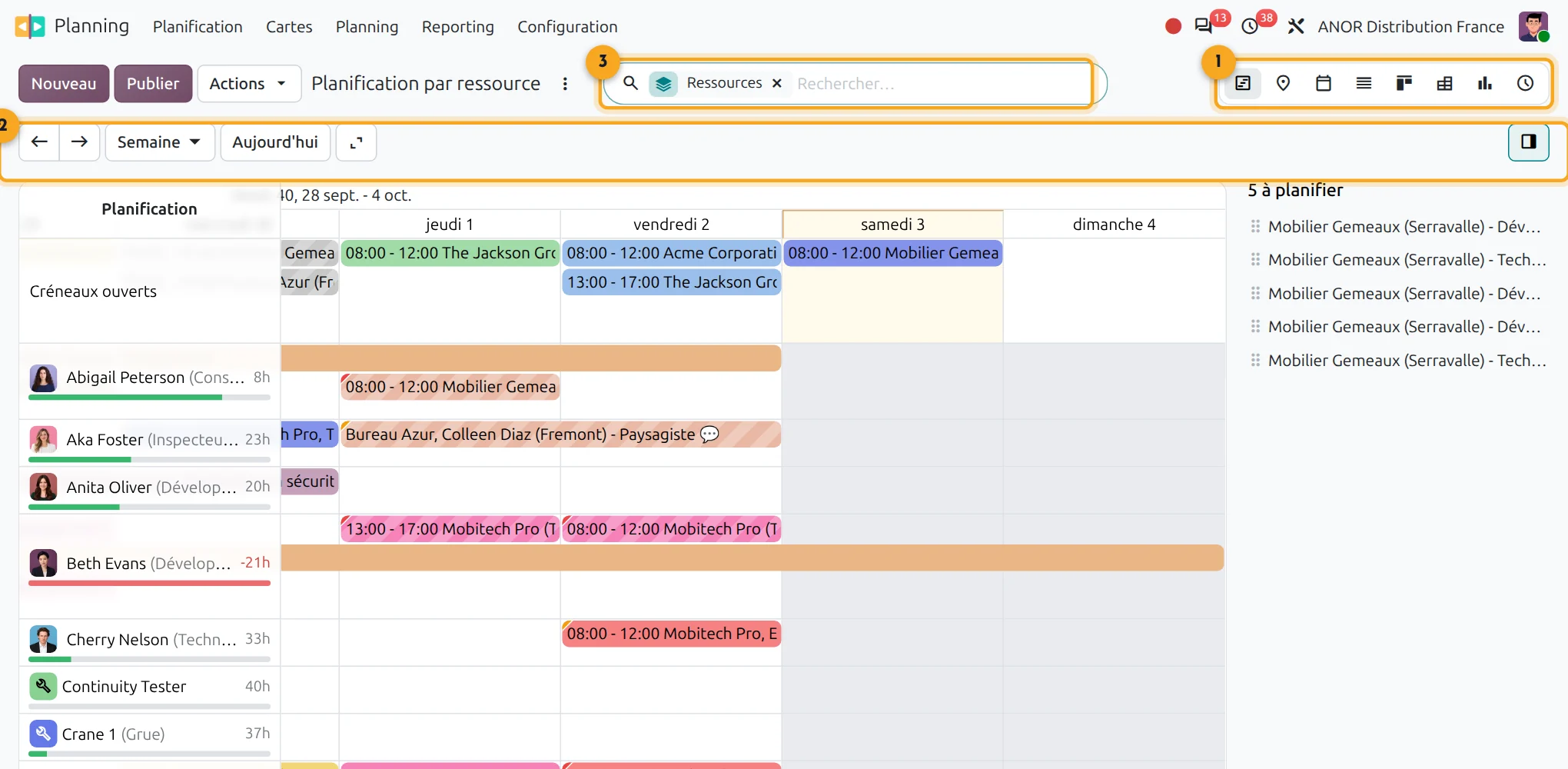
1Switching views
Gantt, map, calendar, list, kanban or graph.
2Period
Week, day, back to today.
3Search
Filter by resource or customer.
Why is a job not always invoiced?
Job sheets come back on paper, sometimes the following week, sometimes illegible. Parts used turn up by chance during a stock count. Invoicing is done at month end, on reconstructed information and some jobs are never invoiced.
With Odoo Field Service, the assignment, the report, the parts and the time are all on the same record. The invoice follows from what was entered.
Short answer: Odoo Field Service shortens the delay between work and invoice, provided you have a service catalogue and disciplined entry in the field.
Technician scheduling and field work: points to scope
Round planning
Planning organises interventions by team and time slot. Multi-constraint round optimisation goes through a dedicated tool that we interface.
Vehicle tracking
Real-time GPS tracking is obtained through a dedicated connector, studied with you.
Offline work
Use in basements or dead zones is tested on your configuration before any commitment.
Vehicle stock
Vehicle stock requires team discipline. We define it during scoping.
Service catalogue
A service catalogue makes pricing automatic. We build it with you.
Moving to Odoo 20
In Odoo 20, interventions rely on Planning rather than Project. We prepare the organisation and the training of teams.
Our method for deploying Odoo Field Service
1
Write the service catalogue
Flat rates, hourly rates and associated parts: without a catalogue, automatic invoicing does not exist.
2
Map the flow
Who creates the job, who assigns it, who checks that it is billable and within what timeframe.
3
Equip the technicians
We configure reports, signatures and on-board stock, then train the teams in the field.
4
Steer the first few months
We track the delay between job and invoice and the jobs left without an invoice.
A flow to write down before configuring
Uninvoiced jobs come from a flow that was never written down: who closes, who checks, within what timeframe. Our organisation consulting formalises it upstream: a free situation audit, then a process review of 3 to 8 weeks, from customer request to invoice.
In Odoo 20, Odoo Field Service relies on Odoo Planning, with timesheets to invoice the time spent, intervention reports for on-site signature and stock for parts. It is aimed at service companies that work at their customers' premises.
Odoo 20 AI for field service
Odoo 20 embeds AI in a particularly advanced way: AI agents in the applications, AI-computed fields and connection to external tools through the MCP protocol. Your field service benefit without heavy development: we check with you which uses bring a real gain before enabling them.
Frequently asked questions about Odoo Field Service
Yes, Odoo works on mobile to view the round, add photos, record time and parts and get the customer's signature.
Yes, they are recorded on the job and then deducted from stock. On-board stock does, however, require disciplined entry.
Yes, if the service catalogue is in place. Time and parts are valued according to the sale or contract.
Standard planning is done by availability and area, with a map view. Multi-constraint route optimisation goes through a dedicated tool that we interface with Odoo.
Subscriptions and the Maintenance app make it possible to track due dates and schedule visits. We specify the configuration during scoping.
Odoo Field Service, because it links technician scheduling, the job report, parts stock and the invoice in the same ERP as sales management and accounting. Everything is included in the Custom plan at €35.90 per user per month for the first year (€44.90 afterwards).
The technician fills in the worksheet on their phone, the customer signs on screen and the report is emailed as a PDF. We configure the worksheet template with you so that it carries your usual wording.


Do your field jobs fit the standard?
Thirty minutes with a consultant to check your service catalogue and your invoicing flow against your actual organisation.