
Odoo applications · Payroll
Odoo OpenPaye interface: linking Odoo HR to your payroll software
Module developed by ANOR for Odoo 19. Employees, contracts, absences and variables go from Odoo to OpenPaye and payroll accounting entries come back into Odoo.
Between the ERP and payroll there is often a spreadsheet: someone exports, copies, adds bonuses from memory and sends a file. The Odoo OpenPaye interface, a custom Odoo development by ANOR, replaces that re-keying with traced exchanges between payroll and accounting. Payroll responsibility stays with OpenPaye.
The module's functions
What is actually present in the delivered module.
Employee synchronisation
From the form, a list action, the synchronisation wizard or a weekly scheduled task to be activated.
Contract synchronisation
Active contract versions are sent with their OpenPaye-specific parameters.
Absences and variables
When a validated payslip is sent, the configured absences, bonuses and overtime are transmitted.
Entries import
Payroll entries arrive as drafts in the chosen journal, with one reference per period.
Synchronisation log
Each operation is traced: direction, status, period and details of any error.
Multi-company
Each company has its own credentials, file code, journal and rule mappings.
The starting point: the employee record
The contract and employee details entered in Odoo are the source of what is sent to OpenPaye.
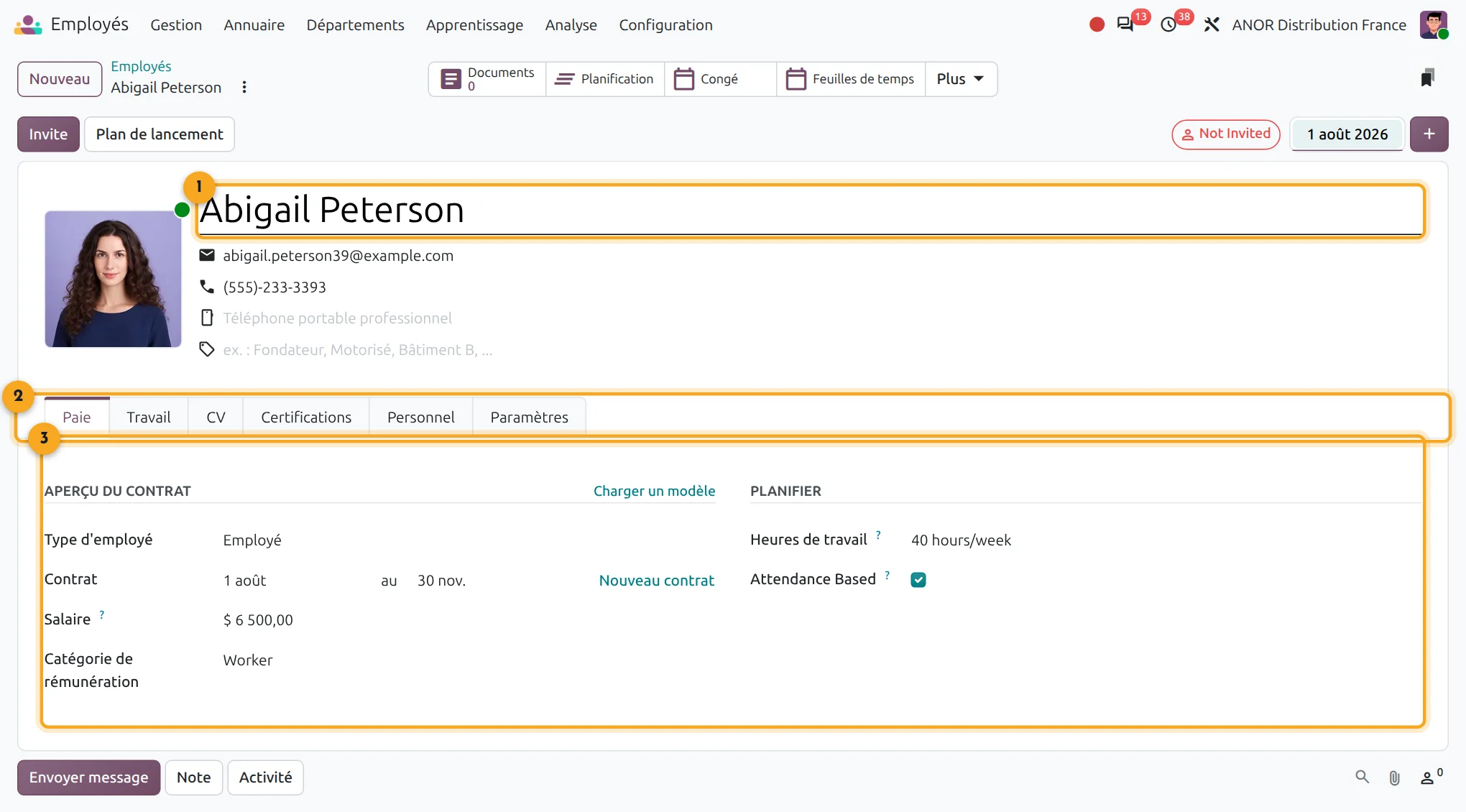
1Employee identity
Name, contact details and attachments come from the record.
2Tabs
Payroll, Work, Resume, Certifications, Private and Settings.
3Contract overview
Employee type, contract, salary and working hours.
What exactly does the Odoo OpenPaye interface do?
The module synchronises Odoo and OpenPaye through the payroll software's API. It is used in Odoo's Payroll application, in an OpenPaye menu and is configured company by company.
Odoo to OpenPaye direction
- Employees: civil status, contact details and social security number, from the employee form or in bulk.
- Contracts: dates, monthly gross salary, working time, contract type, professional status and pension scheme.
- Absences: leave validated within the payslip period, with the OpenPaye code carried by each leave type.
- Bonuses and overtime: read from the Odoo payslip lines, according to a mapping setup between salary rules and OpenPaye variables.
OpenPaye to Odoo direction
- Payroll accounting entries: imported for a given month, manually or automatically each month, into the journal you choose.
Short answer: the module sends HR data and variables to OpenPaye and brings payroll accounting entries back. It does not calculate any payslip.
Points to scope before starting
Payslip calculation
Payroll stays with OpenPaye, along with its regulatory responsibility: the module calculates no payslip.
Social declaration
The monthly social declaration (DSN) is handled by OpenPaye.
Data transmitted
Only absences and configured payslip lines are sent. Expense reports and timesheets are handled separately.
Imported entries
Lines arrive on the accounts with no analytic axis: analytic allocation is done afterwards in Odoo.
Unknown accounts
A line whose account does not exist in the Odoo chart of accounts is ignored and flagged in the technical logs.
Collective agreements
Specific agreements call for a case-by-case decision on the variables transmitted.
For needs not covered, we look at a custom development after checking what configuration allows.
Our go-live method
1
Define the scope
We check that your Odoo payroll and your OpenPaye file are compatible with the module and what should be sent or not.
2
Configure the company
Access credentials, file code, payroll entries journal and automatic sending on validation, if you wish.
3
Map the rules
Each Odoo salary rule receives its OpenPaye code and its type: bonus, overtime or simple information.
4
Test on one month
We send a test month, check the synchronisation log, then compare the entry received with the payroll.
Prerequisites for linking payroll and accounting
- Odoo 19 with the Payroll and Time Off applications, which requires the Enterprise edition.
- An employee number (badge ID) filled in on each employee: it serves as the identifier in OpenPaye.
- Access to OpenPaye's API for your payroll file.
- An Odoo payroll structure whose rule codes are known, in order to build the mappings.
For HR in the broader sense, see Odoo HR. Payroll closing often reveals a blurred boundary between HR, accounting and managers: our organisation consulting clarifies it, starting with a free situation audit and then a process review of 3 to 8 weeks.
Frequently asked questions about the Odoo OpenPaye interface
Payslips are calculated and declared by OpenPaye, which keeps regulatory responsibility. The module transmits the data and brings the payroll entries back into Odoo, with no re-keying between the two tools.
Employees, contracts, validated absences, as well as bonuses and overtime read from Odoo payslips according to your mapping setup.
The payroll accounting entries for a given month. They are created in the journal you have chosen, which accounting then reviews.
Yes, two automations exist: sending on payslip validation and the monthly import of entries. They are disabled by default and activated company by company.
The synchronisation log lists each operation with its direction, status and error details. It lets you check the payroll closing.
Yes. Each company has its own configuration: credentials, file code, journal and rule mappings.
Each month the interface imports the payroll accounting entries from OpenPaye into the Odoo journal of your choice, as drafts. Accounting reviews them, allocates analytics if needed and posts them. Payroll and accounting stay aligned with no manual export.
Yes. It is a custom Odoo development whose code ANOR maintains: mappings between salary rules and payroll variables are configurable and a targeted adaptation is quoted during scoping.
The Odoo apps involved


Does your need fall within the scope?
Thirty minutes with a consultant to check compatibility with your payroll and your OpenPaye file.