
Odoo Apps · CRM
Odoo CRM: a pipeline your sales reps actually keep up to date
A CRM rarely fails for technical reasons: it fails because nobody fills it in. Odoo's CRM is linked to quotes, so reps use it to sell, not to report.
This page describes what the Odoo 20 CRM app does out of the box as CRM software for SMEs, its real limits and the ANOR method for making sure the sales pipeline is genuinely kept up to date.
Six strengths of Odoo CRM for your sales pipeline
A pipeline linked to quotes
An opportunity creates a quote in one click and the quote moves the opportunity forward. Reps do not have two tools to maintain.
Emails that log themselves
Your mailbox attaches to records: customer history builds up without copy-pasting.
Activities that structure the week
Reminders for calls, follow-ups and meetings: the CRM becomes a to-do list, not a form to fill in.
Weighted forecasts
Management sees expected revenue by month and can discuss each opportunity that makes it up.
Qualified losses
Price, lead time, competitor or no budget: you finally see why you lose.
Leads from your website
A request sent from the website form becomes an assigned lead, with its source.
The CRM pipeline, up close
Each opportunity moves from stage to stage, with the amount of every column visible at a glance.
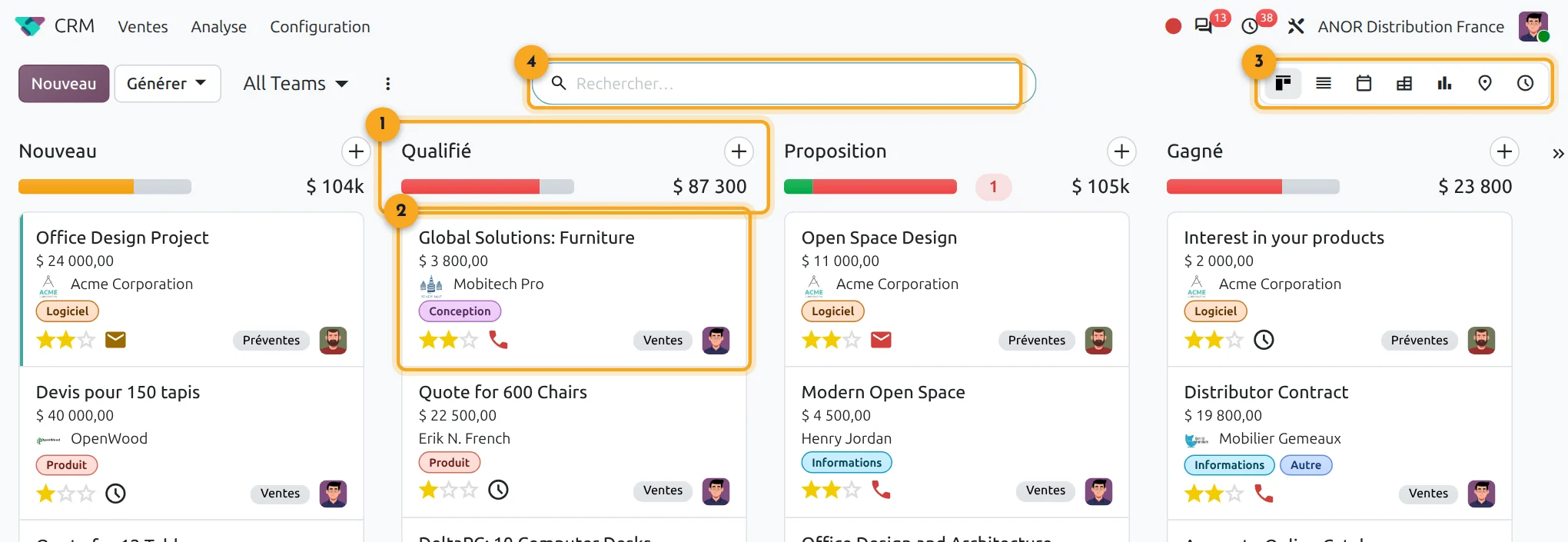
1Pipeline stages
The total of each stage reads at the top of the column.
2Opportunity card
Customer, amount, priority and planned activity on a single card.
3Switching views
List, calendar, pivot, graph, map or activities.
4Search
Find a lead by customer, salesperson or stage.
What does Odoo CRM cover?
Short answer: Odoo CRM covers lead and opportunity tracking, activities, emails, forecasts and quote creation. It connects to the Sales app on a single database.
Odoo CRM is included in Odoo's "Custom" plan: €35.90 per user per month for the first year, then €44.90 from the second year. All apps are included.
- Linked apps: Sales, Marketing, Website
- Real prerequisite: sales stages your team recognises
- Go-live: short, with the duration depending mostly on migrating your customer file
Points to scope before starting
Advanced outbound prospecting
beyond a certain volume of sequences, a dedicated tool remains superior.
Data enrichment
it relies on third-party services, often paid, whose coverage in France varies.
Lead scoring
it exists but needs serious configuration to be useful.
Management
no CRM keeps a pipeline alive if leadership never looks at it. That is a management issue, not a software one.
The problem you recognise: nobody knows what is in the pipeline
Every rep has their own file, notebook and memory. The weekly meeting consists of asking "where are you on this?". When someone leaves, their portfolio leaves with them and the promised follow-ups fall through.
A pipeline that does not fill up is often the symptom of a sales process that was never written down: who qualifies, who follows up, when to give up. We deal with this in a process review before configuring the tool: a free situation audit, then scoping of your sales stages with an Odoo consultant.
ERP and CRM in the same tool: what changes
Odoo's CRM is neither an add-on layer nor a third-party connector: it is a native app sharing the same database as Sales, Inventory, Accounting and Marketing. The rep sees the customer's outstanding balance and late payments before following up; the accountant sees the sales history before blocking an order.
- A quote is born from the opportunity, becomes an order in one click, triggers the delivery and then the invoice, without re-keying.
- One customer record for inside sales, the online shop and the point of sale: all your teams work on the same data.
- Emails and Google or Outlook calendars synchronised: every exchange is logged on the relevant record or opportunity.
- CRM tags and segmentation feed email marketing campaigns and marketing automation directly.
We configure the pipeline, the automations and the dashboards around your real sales cycle: long-cycle B2B sales, multichannel distribution or online sales.
The ANOR method for deploying Odoo CRM
1
Sales stages
Together with your reps, we define the stages, the criteria for moving between them and the loss reasons.
2
Configuration
Teams, assignment rules, activity types and forecasts are set up using standard features.
3
Data migration
Your customer and prospect file is cleaned and then loaded, duplicates included.
4
Adoption
Training on real deals and a follow-up check after go-live, through support.
Odoo 20 AI for CRM
Odoo 20 adds AI agents to the CRM app, available in the Enterprise edition, to support the follow-up of leads and opportunities. We check with you which uses bring a real gain before enabling them.
Frequently asked questions about Odoo CRM
Yes. From an opportunity, a quote is created in one click. See the Odoo Sales page.
Yes, emails and meetings can be attached to records. The configuration depends on your mail provider and is checked during scoping.
Not beyond a certain volume. For intensive outbound prospecting, a dedicated tool remains preferable and we interface it if needed.
The CRM goes live faster than an app that migrates stock or accounting entries, because the data migration stays light. The duration depends mostly on how clear your sales process is.
Odoo CRM is included in the "Custom" licence at €35.90 per user per month for the first year, then €44.90 from the second year. The integration cost depends on your sales process: it is quoted after a 30-minute conversation.
A CRM that sales reps open in order to sell. Odoo CRM plays that role because the quote, the order and the invoice all start from the opportunity, in the same database as sales management and accounting. It is included in the "Custom" licence and goes live quickly once your sales stages are scoped.
For an SME, rarely. A separate CRM forces you to synchronise customers, quotes and invoices between two tools, with the duplicates and discrepancies that produces. In Odoo, CRM and sales management share the same customer record and the same quote: the rep sells and the reporting takes care of itself.
The Odoo apps involved

CRM
Leads, opportunities, activities and sales forecasts in a single pipeline.


Does your sales process fit the standard?
Thirty minutes with a consultant to check your sales stages and how your reps will really use the pipeline.