Odoo Apps · Inventory
Odoo Inventory: stock at exactly the right level
Locations, lots and serial numbers, cycle counts, replenishment calculated from real demand: stock stops being a cost you endure and becomes a trade-off you manage.
This page describes what the Odoo 20 Inventory app, often called Odoo Stock, does out of the box as warehouse management software, its real limits and the ANOR method for making your stock management reliable. It is aimed at logistics, purchasing and production managers.
Six strengths of Odoo Inventory for stock management
Book stock that is real again
Cycle counts by zone replace the full year-end shutdown. Discrepancies are corrected as you go.
Precise locations
Warehouses, zones, aisles and levels: pickers know where to go and search time goes down.
Calculated replenishment
Minimum stock rules and requirements from orders or manufacturing replace a min-max that has been frozen for years.
Lot and serial number traceability
From the supplier lot to the customer delivered. In the event of a recall, the list of customers concerned comes out quickly.
Guided picking on a terminal
Barcode scanner or tablet, checks on the fly: picking errors become the exception.
Valuation you can stand behind
Weighted average cost, FIFO or standard price, calculated continuously. Stock value is no longer a year-end estimate.
A delivery order, start to finish
The transfer keeps its status, products and availability on a single screen, up to validation.
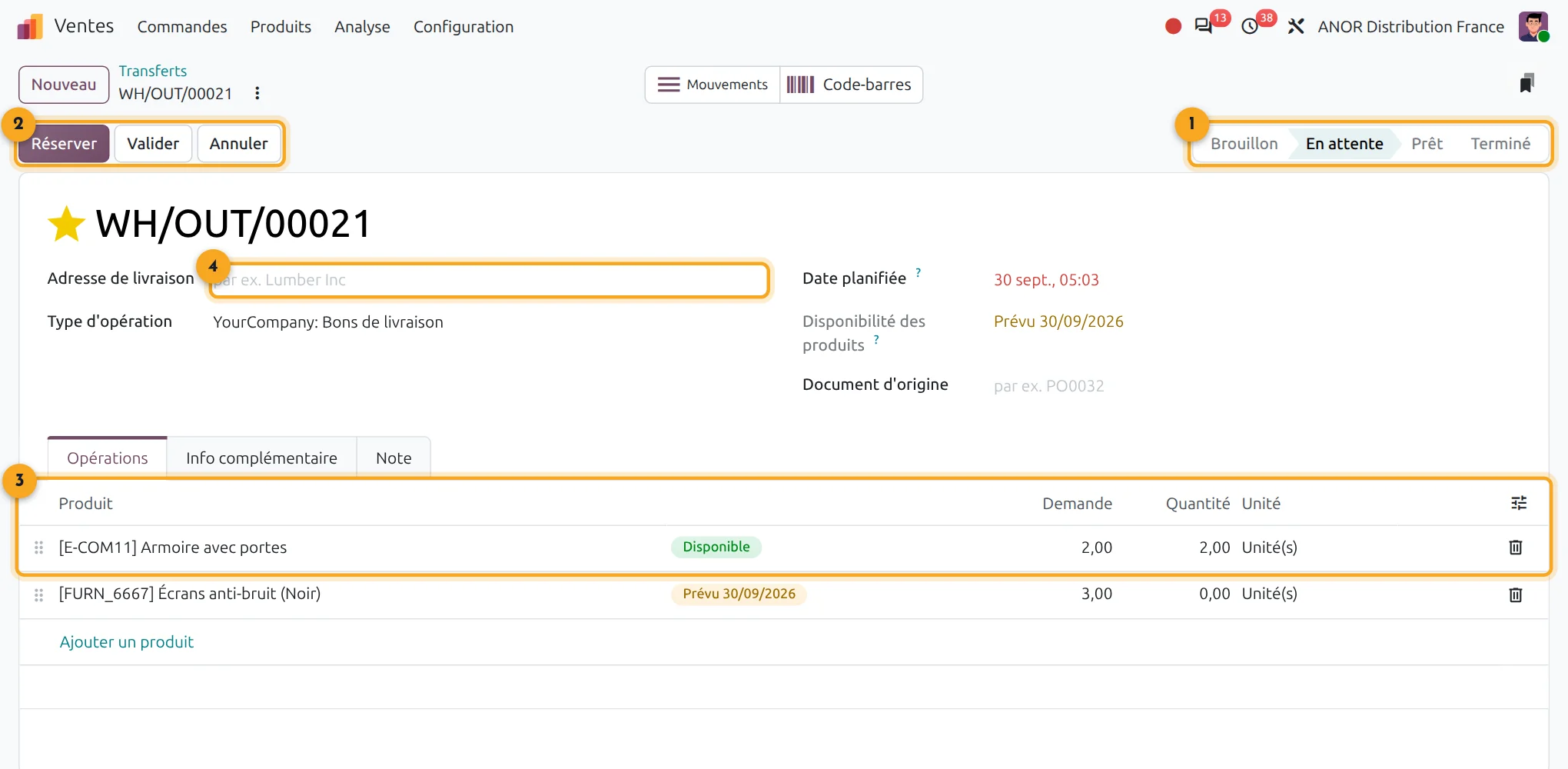
1Status
Draft, waiting, ready or done.
2Actions
Validate, print, return or cancel the transfer.
3Operations
Products, demanded quantities and availability.
4Delivery address
The customer to deliver to, taken from the order.
What does Odoo Inventory cover?
Short answer: Odoo Inventory covers warehouses and locations, receipts, deliveries, transfers, lots and serial numbers, stock counts and valuation. It connects to Purchase, Sales and Manufacturing.
Odoo Inventory is included in Odoo's "Custom" plan: €35.90 per user per month for the first year, then €44.90 from the second year. All apps are included.
- Linked apps: Purchase, Sales, Manufacturing, eCommerce
- Real prerequisite: a cleansed item master
- Go-live: the duration depends on the number of warehouses and the quality of the starting data
Points to scope before starting
Large warehouses
beyond a certain volume or a high level of warehouse automation, a dedicated system is still needed.
Picking routes
it remains limited. Putaway and removal strategies can be configured, without advanced optimisation.
Scales and weighing machines
connecting them requires interface development.
Item master
with duplicates and inconsistent units, the stock will be wrong. It gets cleaned before deployment, not during it.
Wrong stock almost always comes from a master file that was never maintained and movements recorded after the fact. We deal with this upstream, in a process review: a free situation audit of your warehouse flows, then scoping with an Odoo consultant before any configuration.
The problem you recognise: we have the stock, but we cannot find it
The software says twelve units and there are three. You rush-buy what is sitting in another aisle. The annual stocktake ties up the company for several days and the discrepancy found is never explained.
Odoo Inventory addresses these causes: each movement is recorded at the time of the operation, each location is identified and cycle counts detect discrepancies early. The sectors affected first are trading and distribution as well as industry.
The ANOR method for deploying Odoo Inventory
1
Flow scoping
Warehouses, locations, receipts, shipments and replenishment rules are surveyed on site.
2
Master data cleansing
Duplicates, units of measure and barcodes are corrected before any loading.
3
Configuration and testing
Operations, lots, serial numbers and valuation are configured, then tested with the warehouse teams.
4
Opening count and cutover
A physical count sets the opening stock, then go-live is supported.
Odoo 20 AI for Inventory
Odoo 20 adds AI agents to the Inventory app, available in the Enterprise edition, to support warehouse teams. We check with you which uses bring a real gain before enabling them.
Frequently asked questions about Odoo Inventory
Yes. Each warehouse can have its own locations, replenishment rules and inter-warehouse transfers, with full traceability of movements.
Yes. Each item can be tracked by lot or serial number, from supplier receipt to customer delivery.
For most SMEs, yes. For a highly automated or very high-volume warehouse, a specialist WMS remains preferable. We say so during scoping.
Yes. Receipts, putaway, picking, shipments, inter-warehouse transfers, lot traceability and cycle counts cover the daily life of an SME warehouse, with the Barcode app on a handheld terminal. Everything is connected to purchasing, sales and accounting in the same database.
Yes, with Odoo's Barcode app on a scanner or tablet. The hardware is validated before purchase.
Weighted average cost suits most cases. FIFO or standard price are chosen according to your accounting and decided with your accountant before the start.
Odoo Inventory is included in the "Custom" licence at €35.90 per user per month for the first year, then €44.90 from the second year. The integration cost depends on the number of warehouses: it is quoted after a 30-minute conversation.
The Odoo apps involved

Inventory
Stock, warehouses, receipts, deliveries and traceability.


Does your stock fit the standard?
Thirty minutes with a consultant to review your warehouse flows and the state of your item master.