
Odoo Apps · Timesheets
Odoo Timesheets: entry that is quicker than forgetting
Unrecorded time is a common source of margin leakage in service companies. The only time entry that works is one that takes less time than avoiding it.
Odoo Timesheets lets every employee log hours against jobs and lets the company value them through to time-and-materials invoicing. ANOR rolls out time tracking at service companies and IT consultancies with one simple rule: what is billable is decided before entry, not after.
What the standard covers, from time entry to invoice
What time tracking brings in Odoo 20, with the Custom plan that includes all apps.
Weekly grid entry
In the Enterprise edition, one row per job and one cell per day. Employees fill in their week in a few minutes.
Timer
Start and stop on the current task (Enterprise). Useful for fragmented roles, where reconstructing the week on Friday is wishful thinking.
From time to invoice
Billable hours feed the invoice on the terms of the sale. No more reconciliation spreadsheet in between.
Billable or not from the moment of entry
The distinction follows the task and the sales line; it is not decided after the fact.
Time off and time worked
Approved leave and time worked are read together, which prepares payroll variables.
Billing rate
The billing rate compares billable time with the billable target set per employee (Enterprise) and informs hiring decisions.
Everyone's week in a single grid
Hours are entered by day and by task, with each person's total at the end of the row.
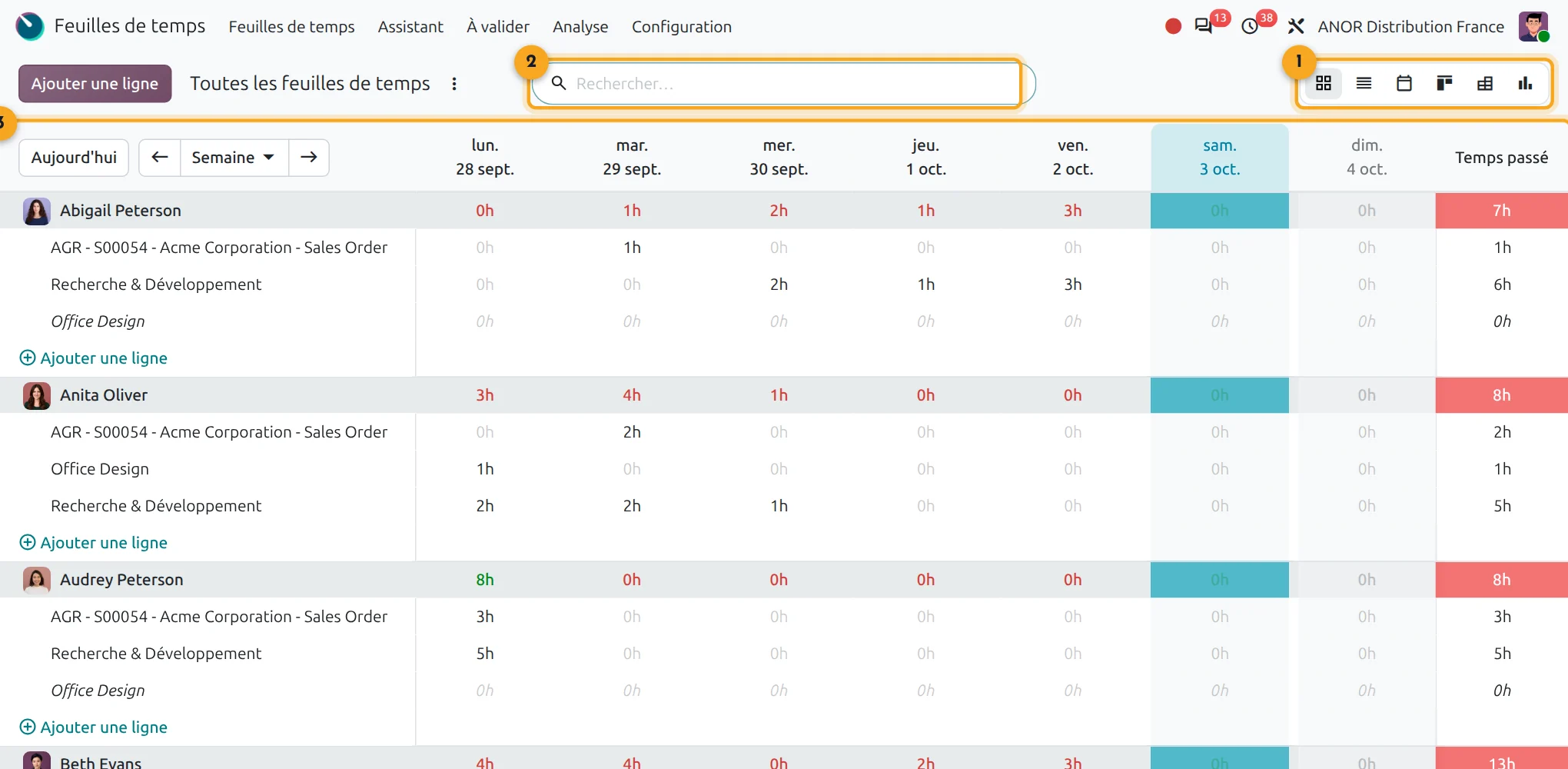
1Switching views
Grid, list, calendar, kanban, pivot or graph.
2Search
Filter by person, project or period.
3Weekly grid
Hours per day and per task, with the week's total (Enterprise).
Why do hours get lost?
Everyone logs hours their own way, sometimes from memory at month end. Part of the work done is never invoiced: nobody remembers for whom or when. Over a year, these forgotten hours eat into margin without anyone seeing them.
A useful timesheet is quick to fill in, tied to a job and a task and readable by the project manager and by invoicing alike.
Short answer: Odoo Timesheets values hours through to the invoice, provided entry is quick and billable time is defined beforehand. Configuration matters as much as the software.
Points to scope before starting
Hardware time clocks
Attendances offers a kiosk and a badge. A physical time clock already in place connects through an interface we quote during scoping.
Working time rules
Durations and overtime are configurable. Before go-live we check with you the legal and collective-agreement rules that apply to your business.
Approval workflow
An approver validates timesheets. For a multi-level workflow, we adapt the configuration or propose a targeted development.
Adoption by teams
Indicators are only as good as the entries. We simplify the entry screen and train teams to use it.
Our method for making time entry work
1
Define what is billable
With management, we set the rule: what is invoiced, what is internal and who arbitrates when in doubt.
2
Configure the jobs
Projects, tasks and sales lines are set up so that entry takes a single click to choose.
3
Close the week
We agree the day and time the week closes and who sends the reminders.
4
Measure and adjust
After a few weeks, we look at the missing hours and simplify whatever is slowing down entry.
An organisation issue before it is a tool issue
Time entry raises three questions: what is billable, who arbitrates and when the week closes. Our organisation consulting handles them upstream: a free situation audit, then a process review of 3 to 8 weeks covering the whole chain, from quote to time-based invoicing.
Timesheets combine with Odoo Project for profitability per job. They also feed payroll preparation, with the Odoo OpenPaye interface for absences. They mainly concern service companies.
Odoo 20 AI for timesheets
Odoo 20 embeds AI in a particularly advanced way: AI agents in the applications, AI-computed fields and connection to external tools through the MCP protocol. Your timesheets benefit without heavy development: we check with you which uses bring a real gain before enabling them.
Frequently asked questions about Odoo Timesheets
Yes, Odoo can be used from a phone's browser or with the mobile app. The exact behaviour of the grid and the timer on mobile is best checked in a demo.
Yes. The distinction is carried by the task and by the sales line, which avoids arbitrating after entry.
The standard offers a kiosk and badge check-in through the Attendances app. A physical time clock already in place connects through a custom interface, which we quote case by case.
They prepare the data, but French payroll stays with a specialist vendor. We integrate Odoo with OpenPaye to pass on absences and variables.
With a clear closing rule, regular reminders and entry reduced to the essentials. We set this up at the start, then adjust based on results.
Odoo Timesheets, linked to Odoo Project and Sales, covers time entry, approval, the billing rate per consultant and time-and-materials invoicing. For a consultancy it is the same tool as sales management and accounting, included in the Custom plan at €35.90 per user per month for the first year (€44.90 afterwards).
Yes. Approved hours on a billable sales line feed the invoice, at the rate set by the quote or contract. During scoping we check that your sales terms translate correctly into the configuration.


Does your time tracking fit the standard?
Thirty minutes with a consultant to define what is billable and check the entry flow against your actual organisation.