Odoo Apps · Project
Odoo Project: the profitability of every job, tracked as you go
Sold budget, time consumed, work remaining, progress invoicing. A project always drifts: the point is to see it at 30% completion, not on the final invoice.
Odoo Project is Odoo's project management app: it organises the tasks of each job and links them to the quote, timesheets, purchases and invoice. ANOR implements it as job costing software at service companies, drawing on 63 years of combined Odoo experience across its partners. We tell you frankly what the standard covers and what needs scoping on top.
What the standard covers for project management
What job tracking brings in Odoo 20, with the Custom plan that includes all apps.
The quote creates the project
A service line that is sold can create a project and its tasks. Hours sold serve as the reference for comparison with what is consumed.
Time consumed, continuously
Each timesheet is logged against the job. Drift shows up during the project, not at the debrief.
Invoicing based on progress
On time spent, at a fixed price or by milestone. The invoice is prepared from project data, with no manual rework.
A kanban tailored to your team
Stages are set to match your actual process. The tool gets adopted because it reflects the way people work.
Remaining work estimated from the field
It is the gap between remaining work and budget that raises the alert, not a declared percentage.
Purchases tied to the job
Subcontracting, equipment, travel: the margin is complete, not just the labour margin.
Tasks, stage by stage
Each task moves through its stage, with progress and deadlines in front of the whole team.
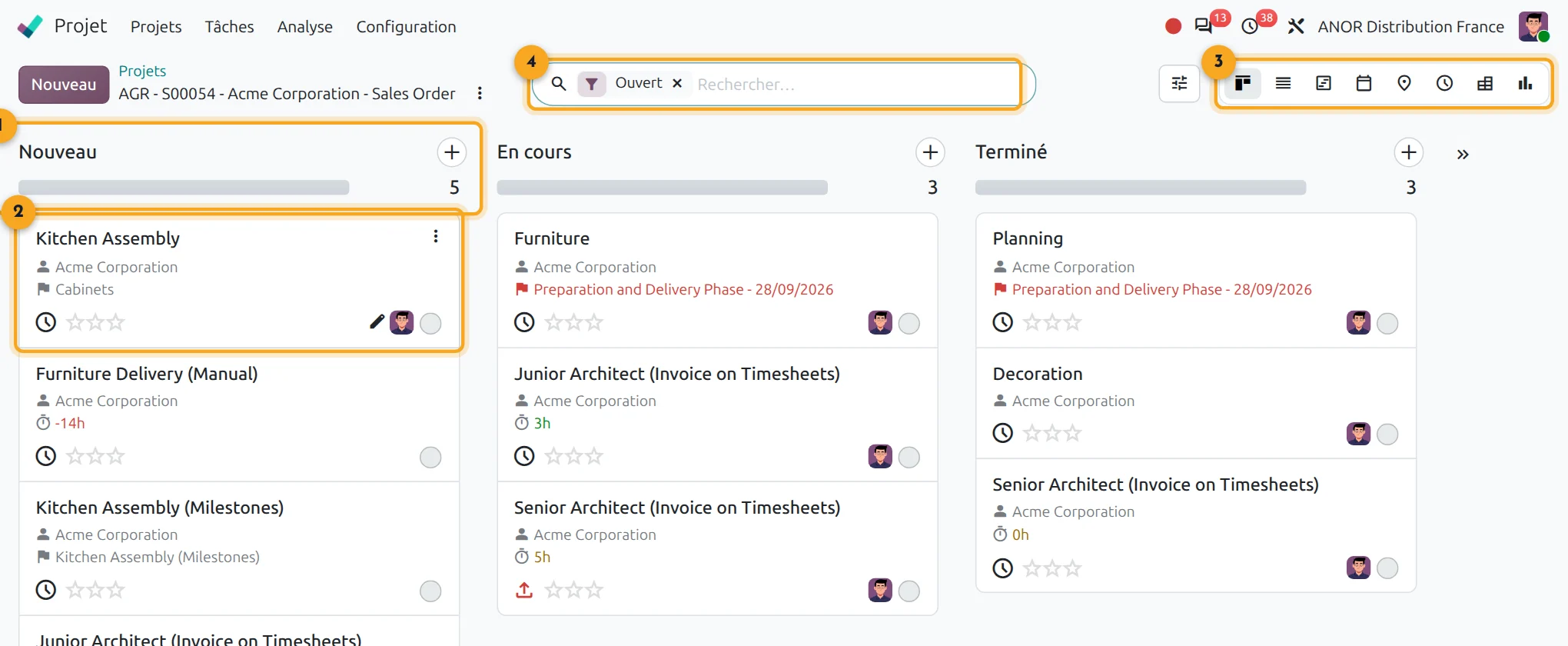
1Stage
Each column is a stage, with its progress.
2Task card
Customer, deadline, planned hours and assignee at a glance.
3Switching views
Kanban, list, calendar, activities or graph.
4Search
Filter by project, customer or assignee.
What is Odoo Project actually for?
In many companies, the budget is in the quote, the hours are in a spreadsheet and the purchases are in the accounts. Reconciling the three takes half a day that nobody has. Drift is spotted at the year-end close, when there is nothing left to fix.
Odoo Project brings this information together on a single job record. Hours sold become the budget, timesheets feed what has been consumed and linked purchases complete the margin.
Short answer: Odoo Project gives you, during the project, the gap between what was sold and what has been consumed. It does not replace a portfolio planning tool.
Points to scope before starting
Resource planning
Planning spreads the workload by person and period. Automatic workload levelling is handled by configuration or a complementary tool.
Gantt chart
The Gantt chart (Enterprise) handles task dependencies and automatic rescheduling.
Project portfolio
Several projects are managed with dashboards and filters. Advanced portfolio consolidation is scoped according to your indicators.
Logged time
Indicators rest on honestly logged time: it is a matter of team culture before being a matter of tool.
For needs that go beyond the standard, we first try to adapt the configuration before proposing a custom development.
Our method for deploying Odoo Project
1
Scope the standard job types
We list your project types, their stages and what is sold at a fixed price, on time spent or by milestone.
2
Break down the tasks
A task breakdown that is stable from one job to the next is the real prerequisite: without it, comparisons are meaningless.
3
Link quotes, time and purchases
We configure project creation from the quote, time allocation and the linking of purchases.
4
Train and follow up
We train project managers to read the gap between sold and consumed, then adjust after the first few jobs.
The last limit is not in the software
A job that goes off the rails almost always reveals a quote priced without input from the field and a remaining-work figure nobody dares to announce. Our organisation consulting offer tackles this upstream: a free on-site situation audit, then a process review of 3 to 8 weeks covering the whole chain, from quote to invoice, before any configuration.
Odoo Project combines with timesheets for time consumed. It is aimed primarily at service companies. See also our sold time, allocated time module.
Odoo 20 AI for Project
Odoo 20 adds AI agents to the Project app, available in the Enterprise edition, to support project managers. We check with you which uses bring a real gain before enabling them.
Frequently asked questions about Odoo Project
Yes, provided hours are logged and purchases are linked to the job. The standard compares sold with consumed. It does not fix a badly priced quote.
Yes. Odoo lets you invoice on time spent, at a fixed price or by milestone. The choice depends on how the service is sold: we set it with you during scoping.
The standard covers tasks, deadlines and simple planning by person and period. For automatic fine-grained capacity levelling, we scope a configuration or a complementary tool with you before you sign.
Timesheets for time consumed, Sales for the budget, Purchase and Accounting for the full margin. The Custom plan at €35.90 per user per month for the first year (€44.90 afterwards) includes all apps.
It depends on the number of job types and the quality of your task breakdown. We discuss it in a 30-minute call, with no commitment.
Odoo Project, combined with Timesheets, Sales and Accounting, forms complete job management software: quotes, time tracking, linked purchases, invoicing and profitability per job in a single tool. All of it is included in the Custom plan, with no third-party module to buy.
Yes. It is short. We start with a free on-site situation audit to list your job types and your invoicing method. This consulting step avoids configuring profitability tracking on an unstable task breakdown.
The Odoo apps involved

Project
Tasks, milestones, planning and project profitability.


Do your jobs fit the standard?
Thirty minutes with a consultant to check your project types and your invoicing method against your actual organisation.