Odoo Apps · eCommerce
Odoo eCommerce: the stock shown is the real stock
A shop that is not a separate system: same catalogue, same stock, same customer and same invoices as a phone sale.
Odoo eCommerce is the online shop connected to the ERP. No overnight connector to maintain: the website reads the catalogue and stock directly. ANOR deploys it for SME ecommerce, from consumer sales to B2B web shops.
What the standard covers, from B2B web shop to SME ecommerce
What the built-in shop brings in Odoo 20, with the Custom plan that includes all apps.
No connector
The shop reads the ERP's catalogue and stock. The classic connector failure does not exist.
A single customer file
Web orders and phone orders share the customer, the history and the pricing terms.
Customer portal
Quotes, orders, invoices and tracking are available to the customer, which cuts down on calls about order status.
Customer-specific pricing
Price lists and payment terms per account, for business-to-business selling.
Payment and delivery
Payment providers and carriers can be integrated, with label generation depending on the carrier.
Search engine optimisation
Meta tags, URLs, sitemap and content can all be managed without development.
The shop, from the customer's side
Catalogue, categories and attribute filters: visitors find and order on the site, linked to stock and invoicing.
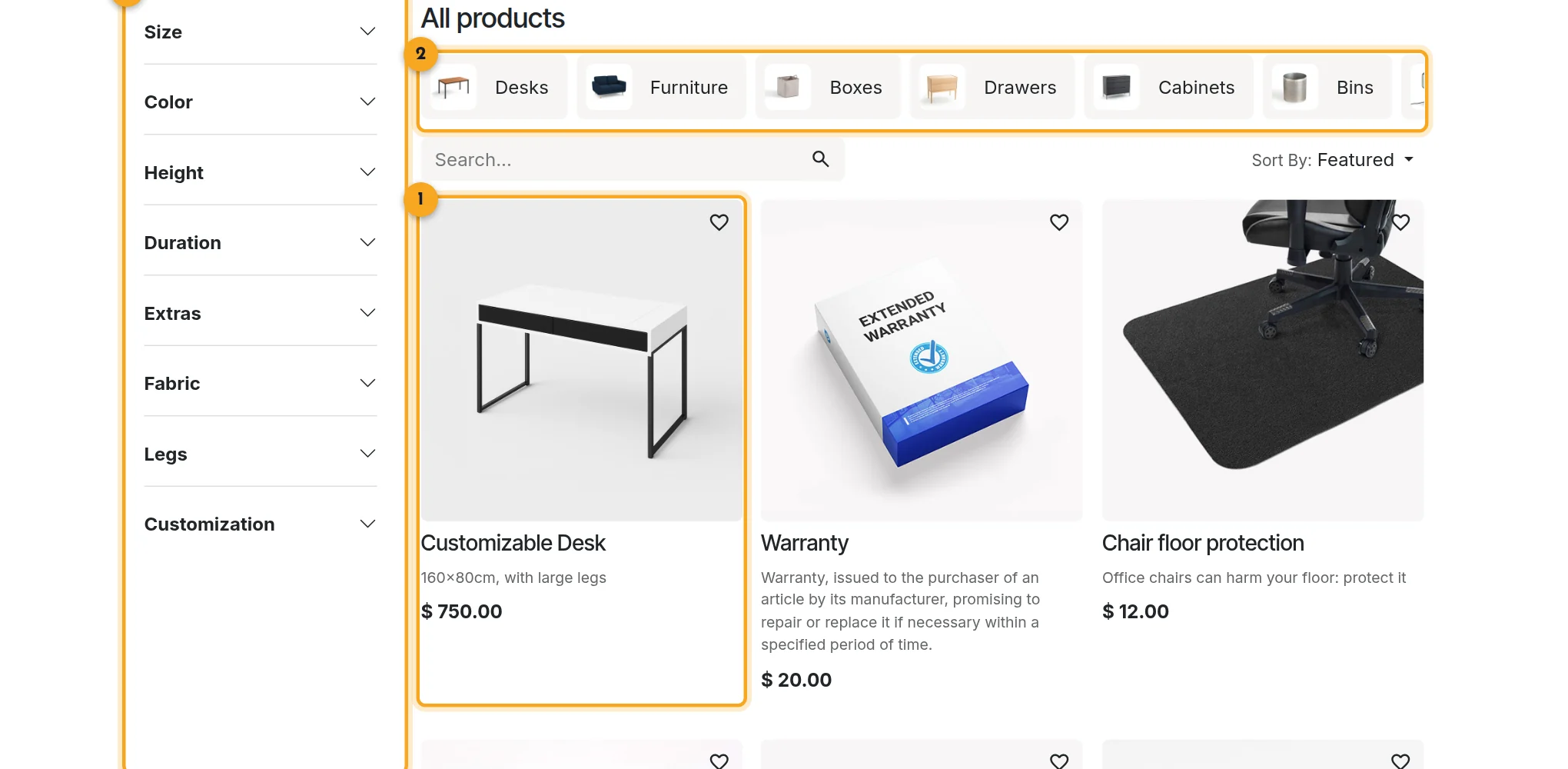
1Product card
Photo, name, short description and price on every card.
2Categories
One click to move from desks to furniture or storage.
3Filters
Size, colour, height or fabric depending on the product attributes.
Why an online shop connected to the ERP?
When the shop runs on a separate platform, synchronised overnight when all goes well, web orders get re-keyed into the ERP. Customers exist twice and stock-outs are discovered after payment.
With Odoo eCommerce, a web order is a sales order like any other. It follows the same picking, delivery and invoicing flow.
Short answer: Odoo eCommerce removes the synchronisation between website and ERP. It does not remove the need for real work on product pages, photos and design.
Points to scope before starting
Recommendations
Alternative products, accessories and upsells are configurable. Deep personalisation goes through a dedicated tool.
Marketplaces
Marketplaces go through a third-party connector that we integrate.
Shop design
The default theme is a starting point. We work on it so that it reflects your brand.
Catalogue structure
A well-structured catalogue makes a readable shop. It is editorial work that we carry out with you.
When a need goes beyond the standard, we first assess a configuration. Otherwise, we scope a custom development with you.
Our method for launching an Odoo shop
1
Structure the product master data
Categories, attributes, photos and descriptions are reviewed before anything goes live.
2
Configure the sales funnel
Pricing, payment, delivery, taxes and terms by customer type.
3
Design the website
We adapt the theme and pages to your brand and prepare the content for search engines.
4
Test, then launch
End-to-end test orders, from web order to invoice, before opening to the public.
A master data issue before it is a website issue
eCommerce projects almost always stumble on product master data: inconsistent categories, missing photos, descriptions written for nobody. Our organisation consulting handles this upstream: a free situation audit, then a process review of the catalogue, the web order and fulfilment.
The online shop pairs with the point of sale for stock shared between store and website. For your business context, see commerce and retail.
Odoo 20 AI for eCommerce
Odoo 20 embeds AI in a particularly advanced way: AI agents in the applications, AI-computed fields and connection to external tools through the MCP protocol. Your online shop benefit without heavy development: we check with you which uses bring a real gain before enabling them.
Frequently asked questions about Odoo eCommerce
No. The shop is part of Odoo: it reads the ERP's catalogue, stock and prices directly.
Yes. Price lists, payment terms and the customer portal are set per account.
They go through a third-party connector, which we assess with you depending on the marketplace and link into the Odoo order flow.
The tools are there: meta tags, URLs, sitemap. The result then depends on the quality of your content and product pages.
It depends on the custom modules you need. We advise you during the scoping call.
Yes. Customer-specific price lists, payment terms, reordering from order history and the customer portal make Odoo eCommerce a B2B web shop linked to sales management and accounting.
The built-in shop, in most cases: it avoids the connector, duplicate customers and stock-outs discovered after payment. We check this with you in a free situation audit covering catalogue, checkout and logistics.
The Odoo apps involved

eCommerce
Online shop linked to stock, prices and accounting.

Website
Pages, blog and forms you can edit without development.


Does your shop fit the standard?
Thirty minutes with a consultant to check your catalogue, your sales funnel and your channels against your actual organisation.